Power King
Get the app

Save your battery before it fails.

Power King watches your power station, batteries, inverter and solar charger over Bluetooth: every cell, every solar watt, every charge. It warns you before a flat battery or a weak cell leaves you without power.

Android 7 or newer · version 1.3.6 · 19.2 MB

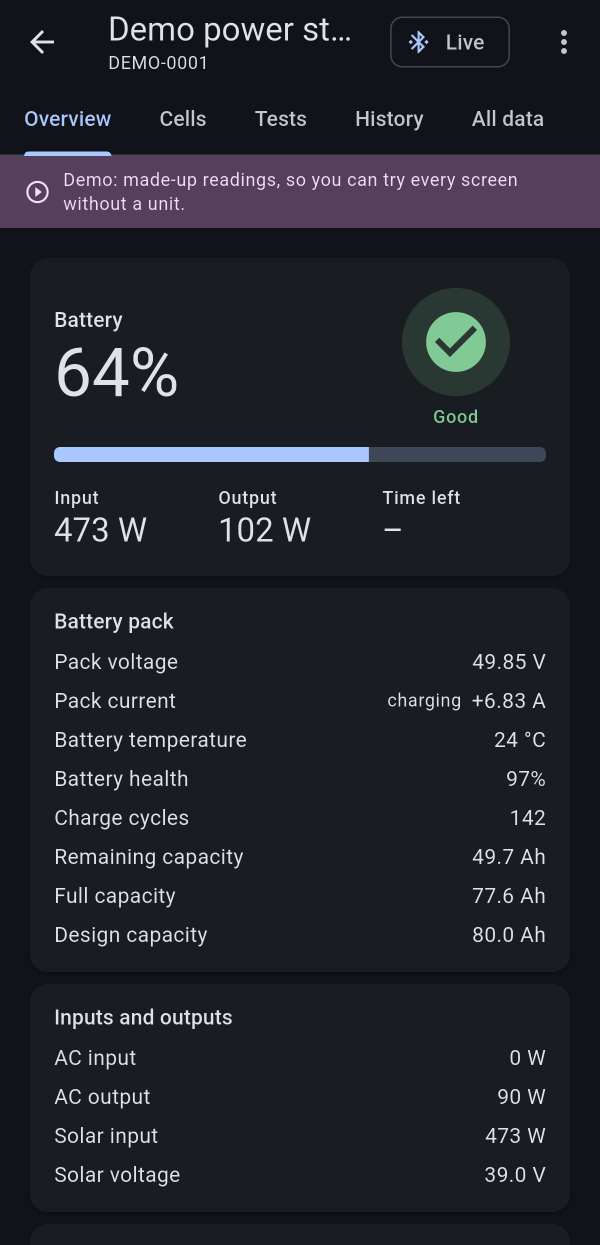
Power King's overview: the charge, with the health check beside it
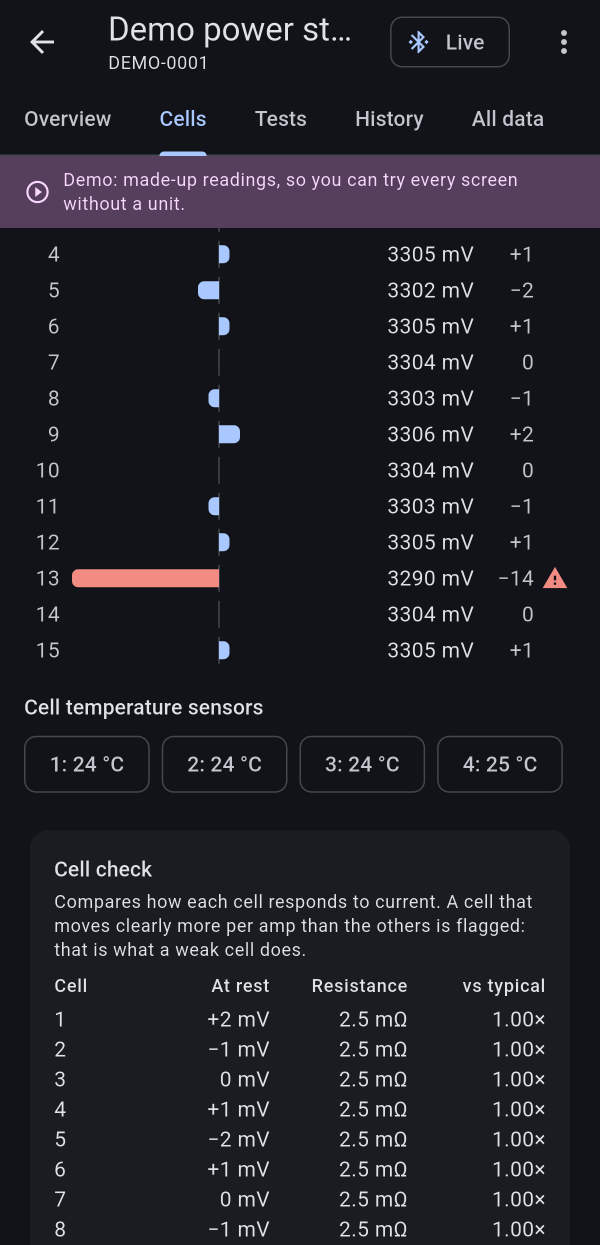
Every cell side by side, cell 13 flagged as weak
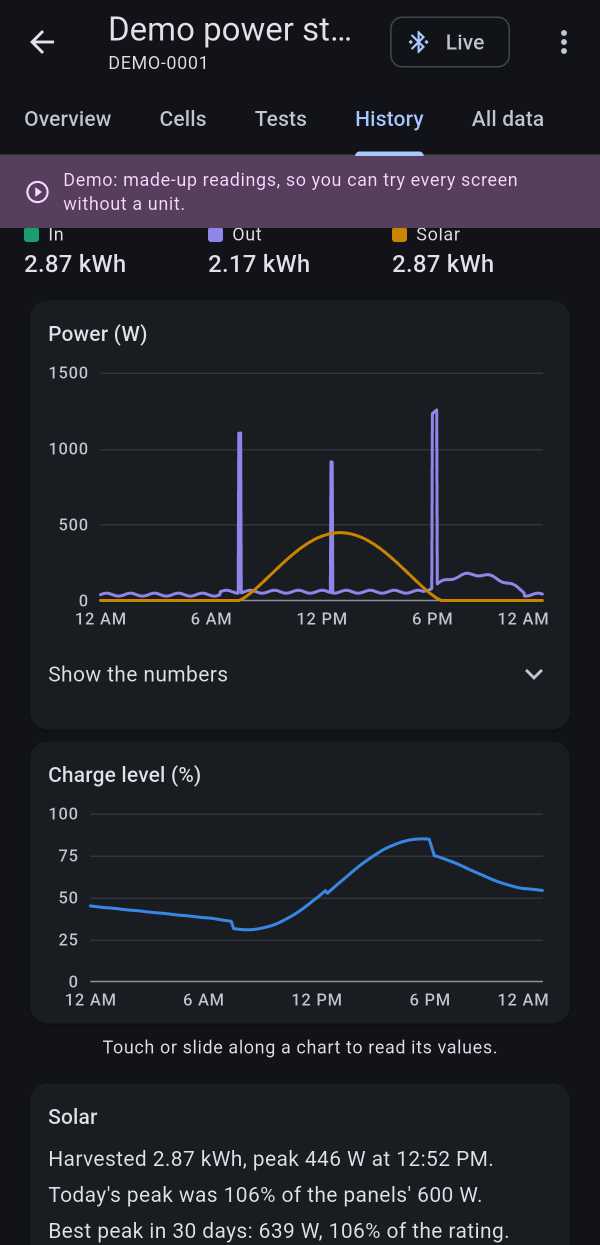
A day of solar, hour by hour
Read-only: it never changes a setting
No account
Your data stays on your phone
Works without the internet

Alerts

Never get caught with a flat battery

Pick a level, and Power King tells you when the charge drops to it. It also tells you when the power goes out and the battery takes over, and before the battery runs empty. It keeps watching in the background, even with the screen off.

Why we built it

One weak cell can cut your power at 42%

It happened to us. Our power station showed 42% when we switched on a hot plate. Less than two minutes later, it switched off.

One of its 15 cells had worn faster than the others. Under the load it fell below 3.0 V while the rest stayed above 3.2 V, so the power station shut down to protect it. Its own screen never said why.

Power King watches every cell. Its cell check finds a weak one by how it behaves under load, and an alert names it, so you can plan around it, or have it fixed, before it leaves you in the dark.

Our power station's 15 cells, seconds before it switched off

Features

Everything your battery is doing, in plain words

Health at a glance

A green, yellow or red check right beside the charge. Tap it to see why.

Every cell

Each cell's voltage side by side, and a check that finds the weak one before it trips your power.

Solar, measured

Every watt your panels make, hour by hour and day by day, against what they're rated for.

Real capacity

A guided load test and a full capacity test show how much your battery really holds.

Watching for you

Alerts, a notification while it watches in the background, and a home-screen widget with each unit's charge.

Take your data anywhere

Readings, daily energy, battery health and test results as spreadsheet files, and health reports to share or save as a PDF.

Made for

CabinsRVs and vansHome backupCamping and boatsSolar setupsBuying usedWall display

Wall display

Your whole system, on the wall

Turn a spare tablet into an always-on display: every unit large, the time, and today's power. It dims and turns dark at night, a problem lights it up again, and after a restart it picks up by itself.

Part of Pro.

Pricing

Free to use. Pro when you want it all.

Free

US$0

  • Each unit's overview, live while Power King is open
  • Charge, power in and out, time left and temperatures
  • A health check in plain words
  • The demo, with every Pro screen

Pro

US$10 a year

less than a dollar a month

  • Low-battery alerts, plus alerts for a full charge, power cuts, heat and weak cells
  • Watching in the background, with the home-screen widget and totals for several units
  • A wall display: a spare tablet shows every unit, day and night
  • Every cell's voltage, and the cell check
  • Load and capacity tests
  • History, solar tracking and battery health over the months
  • Your data exported to spreadsheets (CSV)
  • Health reports to share or save as a PDF
  • Every value the unit reports

7 days free, then US$10 a year, tax included. Cancel anytime. One phone at a time.

Know someone with a battery or power station?Give Pro as a gift

Private by design

No account and no tracking. Your readings stay on your phone, and Power King only reads: it can't change a setting.

Power King keeps nothing about you on any server and never sells your data, your location or any other information.

Works with

Will it work with yours?

Bluetooth lithium batteries, 12 V to 48 VDIY packs with a Bluetooth battery boardSelect power stationsVictron inverters, solar chargers and battery monitorsMore with every free update

The free app is the quickest way to know: open it near your unit and tap it under “Nearby”. If you see its readings, Power King works with it. No account, nothing to pay.

Power King already reads many Bluetooth batteries and battery boards, sold under more names around the world than any list could keep up with.

Not there yet? Tell us your unit: more come in free updates.

Questions

Does it work with my power station or battery?

Power King reads many Bluetooth lithium batteries and DIY battery boards, select power stations, and Victron inverters, solar chargers and battery monitors. The free app is the easiest check: open it near your unit and tap it under “Nearby”; if its readings show, it works. Not supported? Tap “Try the demo” to see what you'd get, and tell us which unit you have.

How do I add a Victron device?

Power King reads Victron inverters, solar chargers and battery monitors, with Bluetooth built in or a VE.Direct Bluetooth dongle, without ever connecting to them. Each one needs its key once: in VictronConnect, open the device, tap the gear icon, then ⋮ › Product info, and tap Show next to Instant readout details. Copy the encryption key, close VictronConnect, then tap the device under “Nearby” in Power King and paste the key.

Can a spare tablet show my whole system?

Yes, with Pro. The wall display shows every unit large, keeps the screen on, dims at night, and starts watching again by itself after a restart.

Is it safe for my unit?

Yes. Power King only reads. It doesn't change or alter any battery's or power station's factory-set parameters, apps or software, and never switches anything on or off.

How does the free week work?

Start Pro on this website with your card. For 7 days it costs nothing, and Power King reminds you two days before the end. If you don't cancel, US$10 is charged for the year.

How do I cancel?

Anytime, at Link, the payment service that sells Pro: from the Pro screen in the app, or at app.link.com. Pro stays on until the end of the time you've paid for.

Can I use it on more than one phone?

One subscription is Pro on one phone at a time. On a new phone, enter your Pro key and move Pro there: that works twice a year.

Is there a version for computers?

Not yet. Power King runs on Android phones and tablets, and on Chromebooks that run Android apps.

Does it need the internet?

Not to read your units: readings, alerts and history all work offline. Pro checks in with our website now and then, and keeps working for weeks without it.

What happens to my data?

It stays on your phone. Power King keeps nothing about you on any server and never sells your data.

Can I get my data out?

Yes, with Pro: readings, daily energy, battery health and test results, as spreadsheet files (CSV) for Excel, Google Sheets or Numbers.

What's next

Power King keeps getting better

More units

New batteries, battery boards and power stations, added as they come out.

An iPhone app

An iPhone version is planned for the App Store.

Always up to date

Kept current with every new Android version, so it keeps running smoothly.

Better with every update

New features and fixes, many of them from your ideas. Updates are always free.

Support Power King

If Power King helps you, a tip helps build what's next: more units, more features, new products and free updates.

Leave a tip

Know your battery. Keep your power.

Free to download. Pro free for 7 days.

Download free

Android 7 or newer · version 1.3.6 · 19.2 MB · Most phones

Other phones: armeabi-v7a (Older phones) · x86_64 (Chromebooks and emulators)

Installing

  1. Tap Download and open the file.
  2. If Android asks, allow installs from your browser.
  3. Tap Install. Power King tells you when a new version is out.
Check the download

SHA-256 of each file, and the fingerprint of the key that signs every Power King release:

  • power-king-1.3.6-arm64-v8a.apk
    3028c1468f51589c5e01f1a6040d6d046a859f426d72c98c64b8033cb15f7e16
  • power-king-1.3.6-armeabi-v7a.apk
    424de91acd66755e5ba571145b37b7374a52d485b64425fa2a746ed12a4c622b
  • power-king-1.3.6-x86_64.apk
    805cf2303e5dc11adb6624f1c92ce9f6069a2903bfc9954d0ec513f83fe06f61
  • Signing key
    74:3E:7E:99:D7:AF:4B:C9:14:45:06:0A:43:5C:E1:07:BC:EB:A1:64:CD:92:E0:FE:06:BD:A4:40:5D:75:1E:59